
How to Download ifmis login mp, Pay Slip from IFMIS MP Employee Portal: A Step-by-Step Guide ifms mp login and pay slip download
ifmis mp login (“ifms” mp) is one of the useful portals for government employees in Madhya Pradesh (MP) is the “Integrated Financial Management Information System” or “IFMIS MP”. This “IFMIS online portal” allows employees to access several important documents, including their ifmis pay slips. If you are an employee in MP and wondering how to download your ifms pay slip, don’t worry! It’s a simple process. Just follow these easy steps, and you’ll have your pay slip ready in no time.
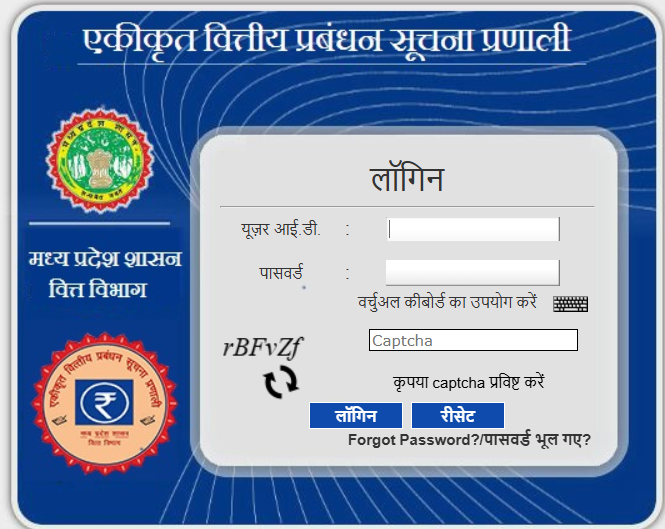
Step 1: Visit the Official IFMIS MP Website ifmis mp employee login of ifmis mp.
First things first! Open your browser (like Google Chrome or Mozilla Firefox) on your computer or mobile phone and go to the official IFMIS MP website. To do this, you need to type ifms login mp mptreasury.gov.in/IFMS in the address bar. Once you press Enter, the website will load, and you’ll see the homepage of the IFMIS portal.
Step 2: Find and Click on the HRMIS Home Button of ifmis mp
After the website loads, look for the HRMIS HOME link. HRMIS stands for Human Resource Management Information System, and it’s the section where you can manage all your employee details, including your pay slips. The HRMIS HOME link is easy to find on the main page of the portal. Just click on it to proceed.
Step 3: Go to Employee Profile ESS in ifmis mp
Once you click on the HRMIS HOME link, a new page will open. Now, look for an option called Employee Profile ESS. ESS stands for Employee Self-Service, and this is where you will find all the important documents related to your job, like your pay slip. Click on Employee Profile ESS to move to the next step.
Step 4: Click on the Employee Pay Slip Option
Step 5: Choose the Year and Month for Your Pay Slip
Once you click on the Employee Pay Slip option, a new page will open with a selection for the Year and Month. Here, you need to choose the year and the month for which you want to download your pay slip. You can simply click on the drop-down menu next to the Year and Month options to select the desired month and year. For example, if you want to download your pay slip for January 2025, just select “2025” in the year option and “January” in the month option.
Step 6: Click on the Generate Option
Once you’ve selected the correct year and month, it’s time to generate your pay slip! You will see a button called Generate on the screen. All you have to do now is click on this button. This will send a request to the system to prepare your pay slip for the selected month and year. After a few moments, your pay slip will be ready for download.
Step 7: Download Your Pay Slip
Now comes the exciting part – downloading your pay slip! After clicking the Generate button, you will see your pay slip on the screen. There will be an option to Download or Save the file. You can either open the file right away or save it on your computer or mobile device for future reference. Most likely, your pay slip will be downloaded as a PDF file, so you can easily open and print it if needed.
Step 8: Check Your Pay Slip in ifmis mp pay slip
ifmis mp ifms login mp “IFMIS” (Integrated Financial Management Information System)MP Government
What does IFMIS (Integrated Financial Management Information System) do?
This system helps the MP government manage its money better,
safer, and faster! Madhya Pradesh government employee can Download
your IFMIS Pay Slips easily .
Download IFMIS Pay Slip –
Click Here (‘https://www.mptreasury.gov.in/IFMS/login.jsp’)
Madhya Pradesh government Cyber Treasury – Click Here (https://mptreasury.gov.in/ )
Why is IFMIS Important?
Before IFMIS, the government used a lot of papers to track money. It took a long time to make payments, and sometimes mistakes happened. Now, IFMIS helps to save time, reduce errors, and keep records safely.
How
Does IFMIS Help?
- Government Employees
– They get their salaries on time without any delay.
- Common People
– The government can send money for schemes (like farmer help, pension,
etc.) directly to people’s bank accounts.
- Government Officials
– They can check all money records anytime, anywhere with just a
few clicks.
Why
is IFMIS Good for MP Government?
✔
Faster payments
✔ No paperwork
✔ Safe and error-free money
management
✔ Better record-keeping
IFMIS makes the Madhya Pradesh
government smarter and more efficient in handling money. It helps everyone
get payments quickly, safely, and without mistakes!
Download
IFMIS Pay Slip –
Click Here (‘https://www.mptreasury.gov.in/IFMS/login.jsp’)
Madhya Pradesh government Cyber Treasury – Click Here (https://mptreasury.gov.in/ )