

Table of Contents
Togglehttps://mptreasury.gov.in/MPCTP
In the modern digital era, governance has shifted dramatically toward transparency, speed, and paperless operations. For a massive state like Madhya Pradesh, managing state finances, employee salaries, vendor payments, and public revenue collection requires an advanced, robust digital framework. This is where the Integrated Financial Management System (IFMS) of Madhya Pradesh, combined with the SNA (Single Nodal Agency) model and Cyber Treasury, comes into play.
If you are a government employee, a vendor, or a citizen looking to understand how financial transactions, online challans, and employee services work in MP, this comprehensive guide will walk you through everything. You can access the official platform directly via the main portal link: MP Treasury IFMS Portal or use the core transaction interface at IFMS MP Production Login.
What is IFMS MP?
The Integrated Financial Management System (IFMS) is a flagship digital initiative by the Finance Department of the Government of Madhya Pradesh.
Budget allocation and distribution across departments.
E-billing and salary disbursement for millions of government employees.
Pension calculations and disbursements for retired personnel.
Revenue collections, tax payments, and non-tax receipts via the Cyber Treasury.
Real-time tracking of public funds through the Single Nodal Agency (SNA) architecture.
By centralizing these operations, IFMS MP eliminates bureaucratic delays, reduces physical paperwork, and minimizes errors in public accounting.
Understanding the SNA (Single Nodal Agency) System in MP
The introduction of the Single Nodal Agency (SNA) model marks a major milestone in how central and state-sponsored scheme funds are managed.
What is an SNA? Under the revamped guidelines of the Ministry of Finance, every state must designate a Single Nodal Agency for major centrally sponsored schemes (CSS). In Madhya Pradesh, the financial tracking of these schemes is integrated with the IFMS framework.
Why is SNA Important? Previously, funds for welfare schemes used to move down layers of multiple bank accounts, leading to idle funds and delayed utilization reporting. With the SNA model linked to IFMS:
Funds are tracked in real-time from the central government down to the implementation agencies.
It ensures “just-in-time” fund releases, preventing unnecessary accumulation of money in commercial bank accounts.
Transparency is greatly amplified, ensuring that every rupee meant for public welfare reaches its designated target without leakages.
The Role of MP Cyber Treasury
One of the most heavily used components of the IFMS ecosystem is the Cyber Treasury. It is a secure payment gateway that allows citizens, businesses, and government departments to make online payments to the state government.
Key Features of Cyber Treasury MP:
Online Challan Generation: Users can generate e-challans for various government receipts, commercial taxes, professional tax, registration fees, and stamp duties.
Multiple Payment Modes: The platform supports net banking, debit/credit cards, UPI, and NEFT/RTGS through integrated partner banks.
Instant Receipt Verification: Once a payment is successful, a digitally verified CIN (Challan Identification Number) and receipt are generated instantly.
Payment Status Tracking: If a transaction fails or gets stuck, users can easily check their e-payment status directly on the portal using tracking references.
Key Services Offered on the IFMS MP Portal
The official portal (https://mptreasury.gov.in/) hosts a variety of dedicated services catering to different stakeholders:
1. Employee Self-Service (ESS)
Government employees can log into their profiles to manage personal and financial milestones:
-
Salary Slips: View and download monthly salary breakdowns, including Basic Pay, Dearness Allowance (DA), House Rent Allowance (HRA), and deductions like GPF and professional tax.
-
Annual Statements: Access annual tax statements and salary certificates for income tax filing.
-
GPF and Loan Details: Monitor provident fund contributions and active advances.
2. Pensioner Services
Retired personnel can use the portal to track their pension revisions, life certificate status (Jeevan Pramaan integration), and monthly pension payment slips without needing to visit district treasury offices physically.
3. Departmental Dashboards and Budget Distribution
Higher authorities and DDOs (Drawing and Disbursing Officers) utilize the dashboard to monitor expenditure trends, check budget allotments, and process digital bills seamlessly.
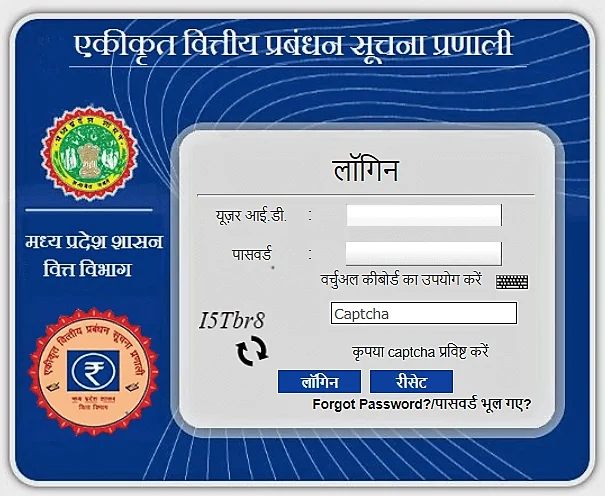
Step-by-Step Guide: How to Use IFMS MP Employee Login
If you are a state government employee looking to download your monthly pay slip or check your ledger through the system, follow these simple steps:
-
Visit the Portal: Open your browser and go to the official portal link:https://mptreasury.gov.in/ or the direct login page at
https://ifmisprod.mptreasury.gov.in/IFMS/login.jsp -
Navigate to Employee Login: Look for the “Employee Login” or “Karmchari Seva” section on the homepage.
-
Enter Credentials:
-
Input your unique User ID / Employee Code.
-
Enter your secure password.
-
Type the verification Captcha Code accurately.
-
-
OTP Verification: Click on login, and an OTP (One-Time Password) will be dispatched to your registered mobile number linked with your treasury profile.
-
Access Dashboard: Enter the OTP to complete authentication.
Once inside, navigate to the pay slip or financial ledger section, select the desired month and year, and download your statement as a PDF.
Troubleshooting and Helpdesk Support
While the IFMS MP and Cyber Treasury portals are designed for high uptime and smooth performance, users occasionally face technical hurdles like login blocks, OTP delays, or transaction failures.
To resolve these issues efficiently, the Directorate of Treasury and Accounts provides dedicated support channels.


